Cypress Studio: E2E Testing with No-Code Test Generation

The landscape of end-to-end (E2E) testing has evolved dramatically over the past decade. While traditional frameworks like Selenium have served development teams for years, they've also introduced significant friction into the testing workflow. Complex WebDriver setups, flaky tests, and slow execution times have long been pain points that developers and QA engineers have had to navigate. Enter Cypress, a modern testing framework designed specifically for the realities of contemporary web development and its game-changing feature, Cypress Studio, which brings no-code test generation directly into the developer's workflow.
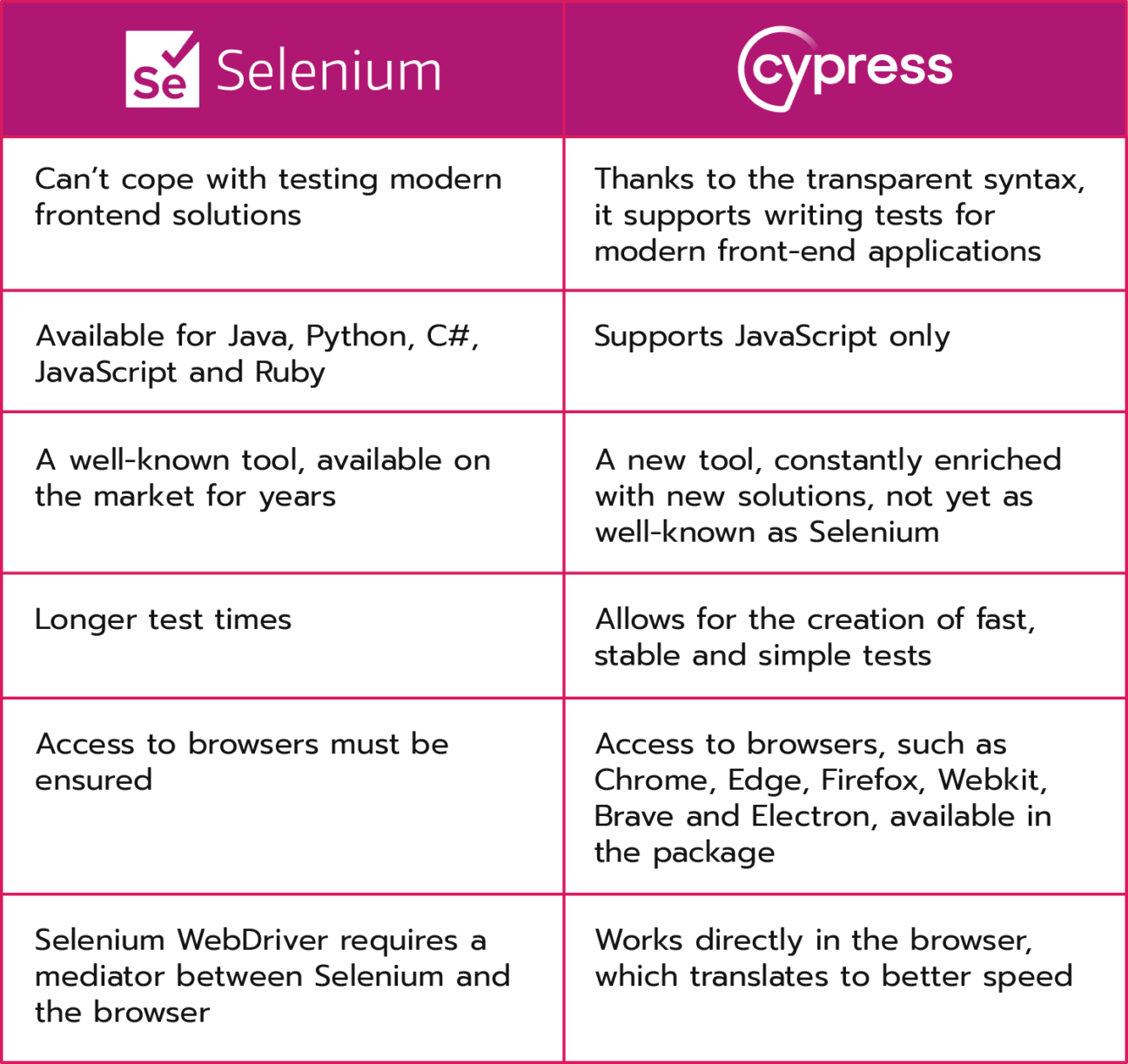
The Case for Cypress
Traditional testing frameworks operate outside the browser, communicating through intermediary protocols that introduce latency and complexity. This architectural decision, while necessary for tools built in an earlier era, creates an inherent disconnect between the test environment and the application being tested. Selenium, for instance, requires WebDriver configuration, deals with asynchronous timing issues that demand manual wait commands, and often produces tests that break unpredictably aka the dreaded "flaky test" phenomenon that undermines confidence in test suites.
Cypress takes a fundamentally different approach by running directly inside the browser alongside your application. This architectural choice provides native access to every DOM element and network request without the overhead of remote commands. The result is faster test execution, more reliable assertions, and a developer experience that feels natural rather than cumbersome.
Key Differentiators That Matter
Automatic Waiting: One of Cypress's most remarkable feature is its intelligent automatic waiting mechanism. Unlike traditional frameworks where devs have to explicitly wait for elements, animations, or API calls to complete, Cypress automatically waits for commands to complete before moving forward. This dramatically reduces an entire category of timing-related bugs and makes tests more stable and maintainable.
Time Travel Debugging: Cypress UI provides real-time visual feedback as tests execute, allowing devs to "time travel" backward through each step of a test run. When a test fails, you can hover over individual commands in the test runner to see exactly what the application looked like at that moment. This capability transforms debugging from a frustrating guessing game into a straightforward investigation.
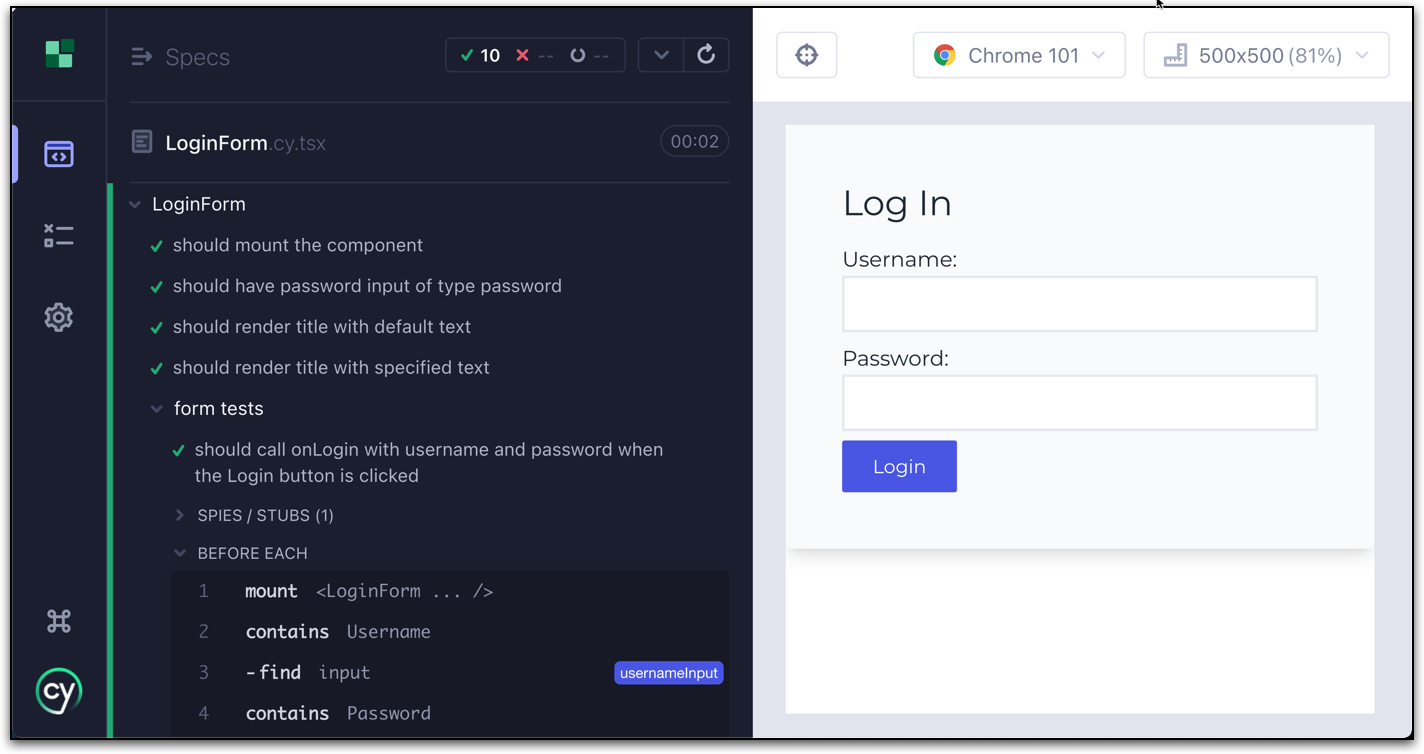
JavaScript-Native Architecture: For teams already working with React, Angular, Vue, or any modern JavaScript framework, Cypress eliminates context switching. Tests are written in the same language as the application code, leveraging the existing expertise of frontend teams. This natural integration accelerates test development and reduces the learning curve for new team members.
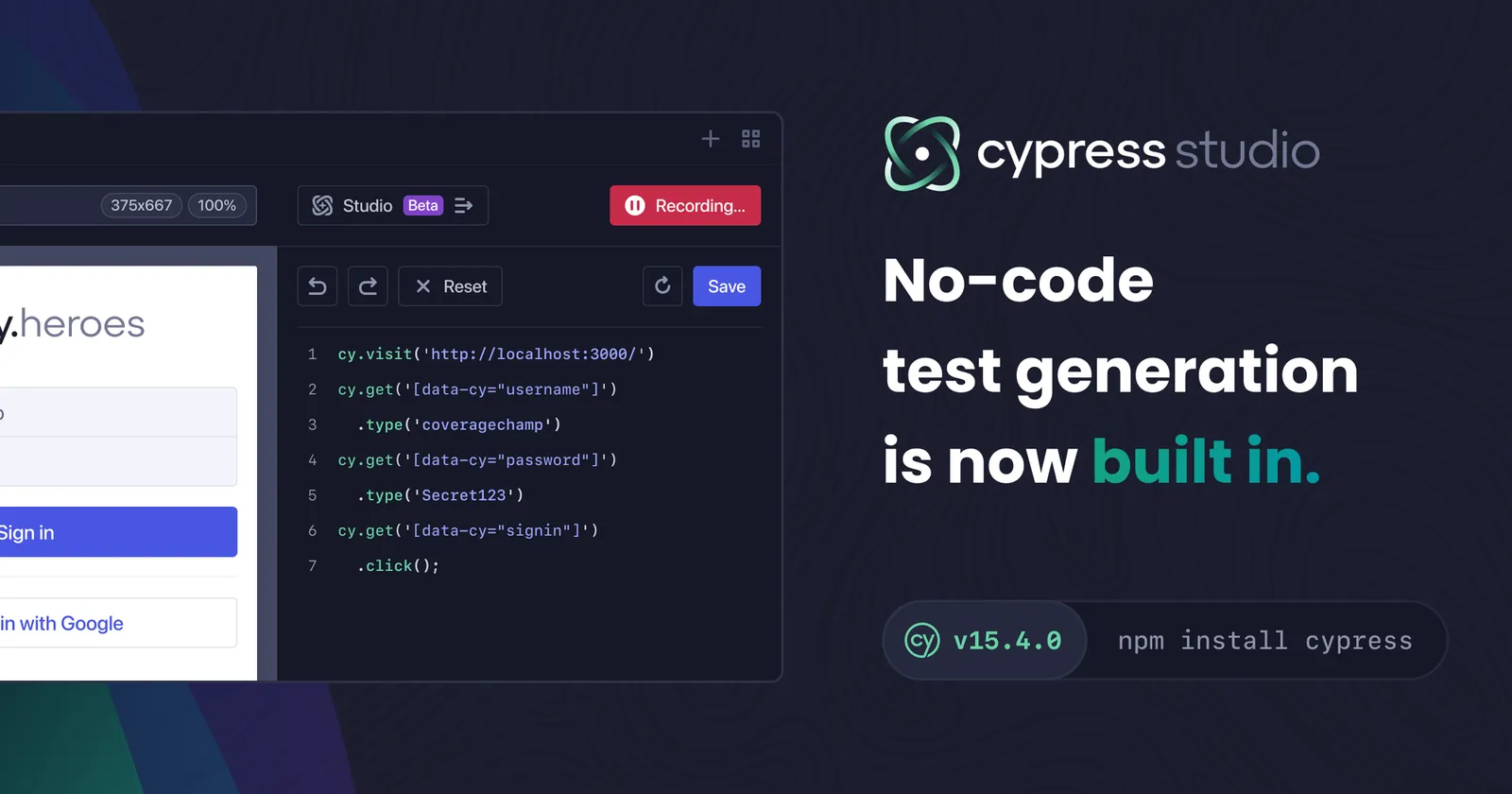
Cypress Studio: No-Code Test Generation
Cypress Studio takes test automation to a whole new level. This integrated no-code test creation tool allows users to generate automated tests by physically interacting with their application in the browser, no coding required.
The implications are profound. Product managers, designers, and QA professionals without deep programming expertise can now create comprehensive test suites by simply clicking through user workflows. For experienced developers, Cypress Studio serves as a rapid prototyping tool, quickly scaffolding test structures that can then be refined and extended with custom logic.
How Cypress Studio Works
The workflow is really intuitive. After enabling Studio in your Cypress configuration (for older versions of Cypress), you can launch it from the Cypress Test Runner.
const { defineConfig } = require("cypress");

module.exports = defineConfig({
  e2e: {
    experimentalStudio: true,  // enable studio
    setupNodeEvents(on, config) {
    },
  },
});
Studio enters recording mode, where every interaction with the application (clicks, form inputs, navigation) is captured and translated into executable Cypress commands. When you finish recording, Studio generates clean, readable test code that you can immediately run, edit, or extend.
This addresses one of the most significant barriers to comprehensive test coverage: the time and expertise required to write tests. By democratizing test creation, teams can achieve broader coverage faster while maintaining the benefits of code-based testing for maintainability and version control.
Advanced Features
AI-Powered Testing with cy.prompt()
The AI landscape continues to evolve, and Cypress is at the forefront with experimental features that hint at the future of test automation. The cy.prompt() command represents the intersection of LLMs and test generation, allowing developers to write test steps in plain English that then translate into executable Cypress commands. First setup a Cypress Cloud project and enable PromptCommand in your Cypress configuration.
const { defineConfig } = require("cypress");

module.exports = defineConfig({
  projectId: "<yourProjectId>", // requires cypress cloud project
  e2e: {
    experimentalPromptCommand: true, // enable cy.prompt
    setupNodeEvents(on, config) {
    },
  },
});
For example, instead of writing:
cy.visit('https://cloud.cypress.io/users/settings')
cy.get('[data-cy="edit-profile"]').click()
cy.get('[data-cy="name"]').type('John Doe')
You can write:
cy.prompt([
  'visit https://cloud.cypress.io/users/settings',
  'click the "Edit Profile" button',
  'type "John Doe" in the name field'
])
Note that prompt always start with a clear action!
This experimental feature showcases the potential for AI to understand testing intent and generate appropriate automation code. While still in development, it points toward a future where test creation becomes even more accessible and the gap between human intent and executable tests continues to narrow.
The Promise of Self-Healing Tests
Perhaps the most exciting part in automated testing is the concept of self-healing tests aka tests that adapt automatically when UI elements change. Minor refactoring that moves a button or renames a CSS class shouldn't break your entire test suite. Cypress' AI capabilities are moving toward tests that use contextual understanding to locate elements more adaptively, making test suites more resilient to the natural evolution of frontend codebases.

Cypress Demo
Best Practices for Maintainable Cypress Tests
While Cypress and Cypress Studio lower the barrier to entry for test creation, following established best practices ensures any test suite remains maintainable and reliable as it grows.
Element Selection Strategy
How you select elements in your tests has enormous implications for test stability. CSS classes and tag names change frequently during development. Text content gets updated for internationalization. Even IDs can be problematic when tied to styling or JavaScript logic.
The recommended approach is to use dedicated data attributes specifically for testing purposes. Add data-cy="submit-button" or data-test="user-profile" attributes to elements that need to be tested. These attributes serve a single, explicit purpose and are isolated from styling concerns and application logic. When a designer updates button styles or a developer refactors component structure, your tests remain unaffected.
Test Isolation and Independence
Each test should run independently without relying on state from previous tests. Use beforeEach() hooks to establish a clean, known state before each test executes. This might include clearing cookies and local storage, logging in programmatically, or resetting database fixtures.
Isolated tests provide several critical benefits: they can run in any order, they can be executed in parallel for faster CI/CD pipelines, and when a test fails, you know exactly what broke without having to trace through dependencies on earlier tests.
Network Request Control
Modern applications make extensive use of API calls, and network variability can introduce significant test flakiness. Cypress' cy.intercept() command allows you to mock API responses, creating predictable test conditions regardless of backend state or network latency.
This capability is particularly valuable for testing edge cases that are difficult to reproduce with a real backend error states, slow responses, or specific data scenarios that would be cumbersome to set up in a database.
Custom Commands for Reusability
Common workflows like authentication, form filling, or navigation should be encapsulated in custom commands. This reduces duplication, makes tests more readable, and creates a single source of truth for complex interactions. When your login flow changes, you update the custom command once rather than hunting through dozens of test files.

The Path Forward: E2E Testing in Modern Development
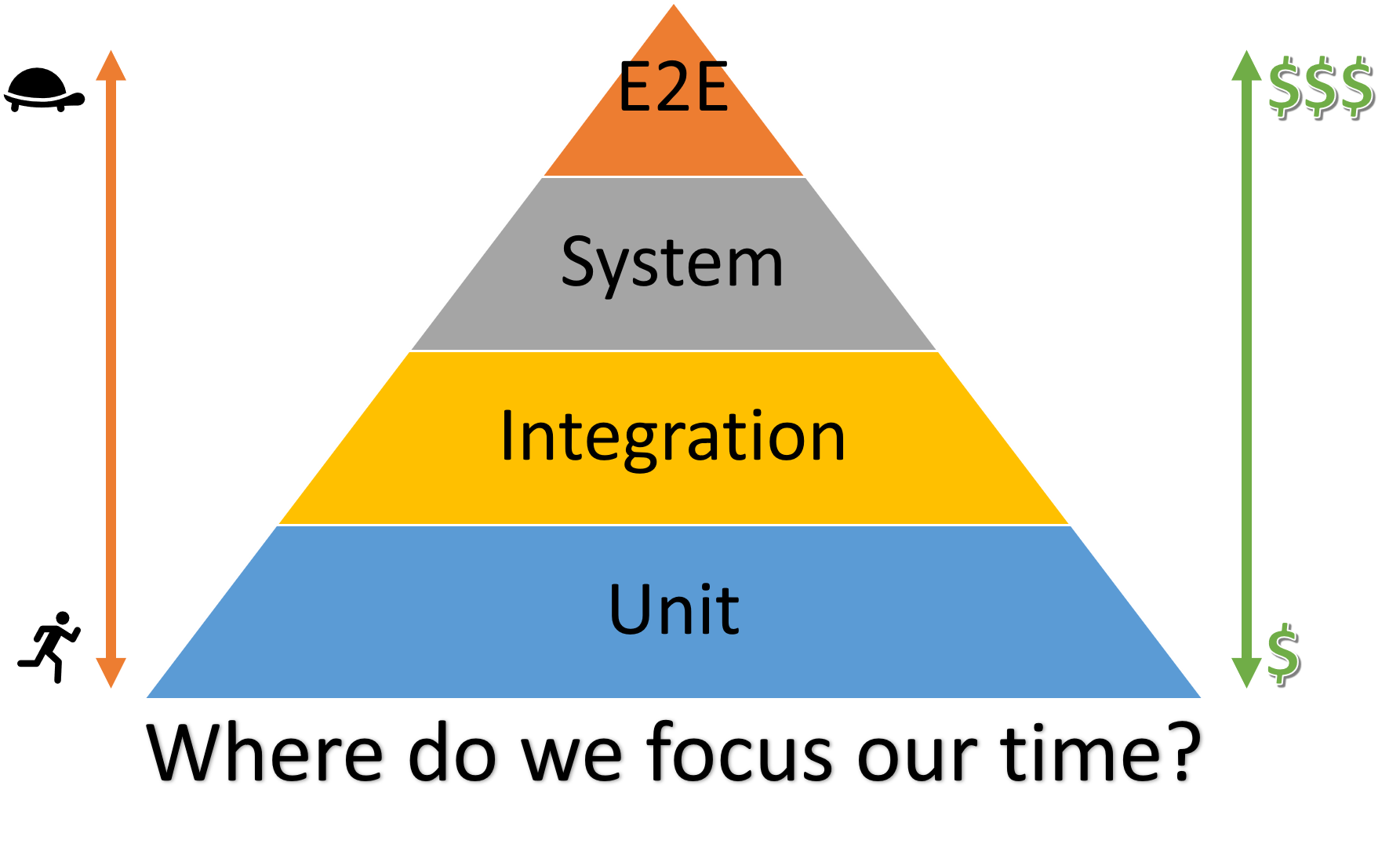
The testing pyramid suggests that E2E tests should be the smallest portion of your test suite due to their cost and complexity. When E2E tests are fast, reliable, and easy to create, they provide tremendous value in catching integration issues and validating complete user workflows.
Cypress Studio and features like cy.prompt() are democratizing test creation, bringing comprehensive E2E coverage within reach of teams that previously couldn't justify the investment. As these tools continue to mature, we're moving toward a future where robust test automation is the default rather than the aspiration, a future where quality is built in from the start rather than bolted on at the end.
For development teams committed to delivering reliable software at velocity, Cypress represents more than just a better testing framework. It's a fundamental rethinking of how we approach quality assurance in the age of continuous delivery. Whether you're a solo developer building a side project or part of a large engineering organization, the combination of Cypress' developer-friendly architecture and Studio's no-code test generation provides a compelling path toward comprehensive, maintainable test coverage.